
Exhibition planning software
Know the exhibit will work before it exists
CurateSense puts the actual artwork on walls true to scale, before anything is approved, shipped, framed, or hung. Create the walls once, plan, organize and place the work to find out what works best.
CurateSense is built by the director of a Southern artist's estate specifically to plan her exhibits — not by a big design software company that doesn’t understand the unique challenges of exhibition planning.
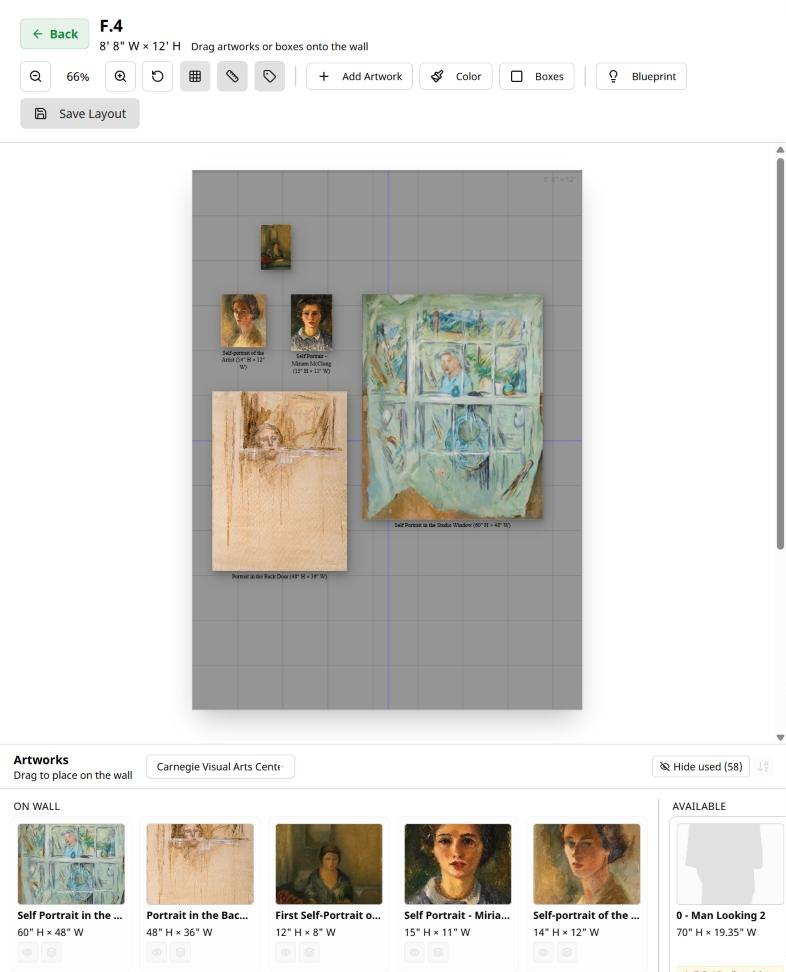
Nobody can picture an exhibit from a list of dimensions
Everyone who plans an exhibit does the same thing at some point: stands somewhere, looks at a measurement written in a notebook, and tries to imagine a 60-inch canvas on a wall they are not standing in front of.
It does not work well. At best it is clunky and painful whether on graph paper, in a spreadsheet, in a slide deck where every image is the same size, or in your head. The gap between what you cobbled together with tools not made for exhibit planning is where the expensive mistakes live.
Then everyone else has to imagine it too. The gallery director, the artist, the client, the committee. They all say yes to a description, and nobody really knows what they actually agreed to will work until install.
Every decision pushed to install day costs more than it had to
The specific failure is always the same shape. The work comes out of the crate, goes up, and something is wrong — too big, too small, too many, too few, wrong wall, wrong order.
It costs money
Reframing. Freight both directions. A crate you did not need. Work that ships and never goes up. Install help paid by the hour for a rehang.
It costs time you had budgeted for something else
An install that should take a day takes two. An approval that needed one round takes three. The hours come out of making work, programming the season, or the next project.
It costs you with the people watching
The artist standing there while you rearrange their work. The client who politely asks what else you can show them. The committee that re-opens a decision. None of them say much. All of them remember.
None of it is a judgment problem. It is a visibility problem, and it resolves the moment everyone involved can see the same wall at real size and know the exhibit works.
Five things, and it does them for every kind of exhibit
01
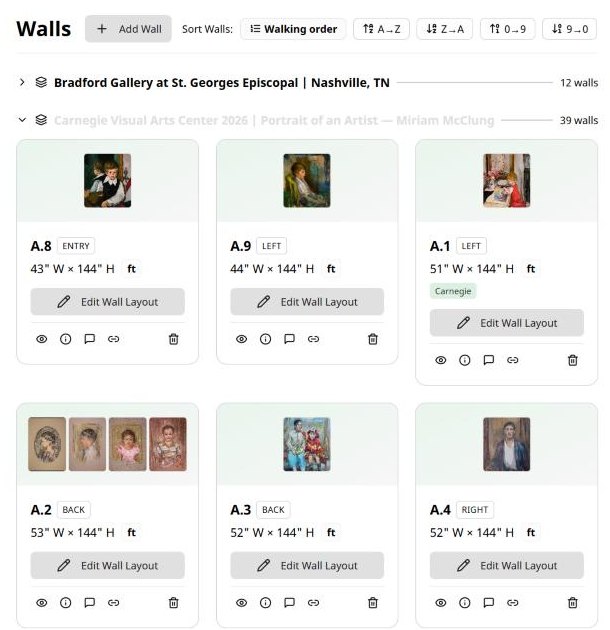
Create the walls, to scale
Enter your rooms and walls at real dimensions, down to the inch. Irregular and sloped walls are handled. Place your actual pieces at actual size, and scale is enforced rather than approximated — a 48-inch work on a 16-foot wall takes up exactly what it will on install day. Enter a space once and it stays entered.
02
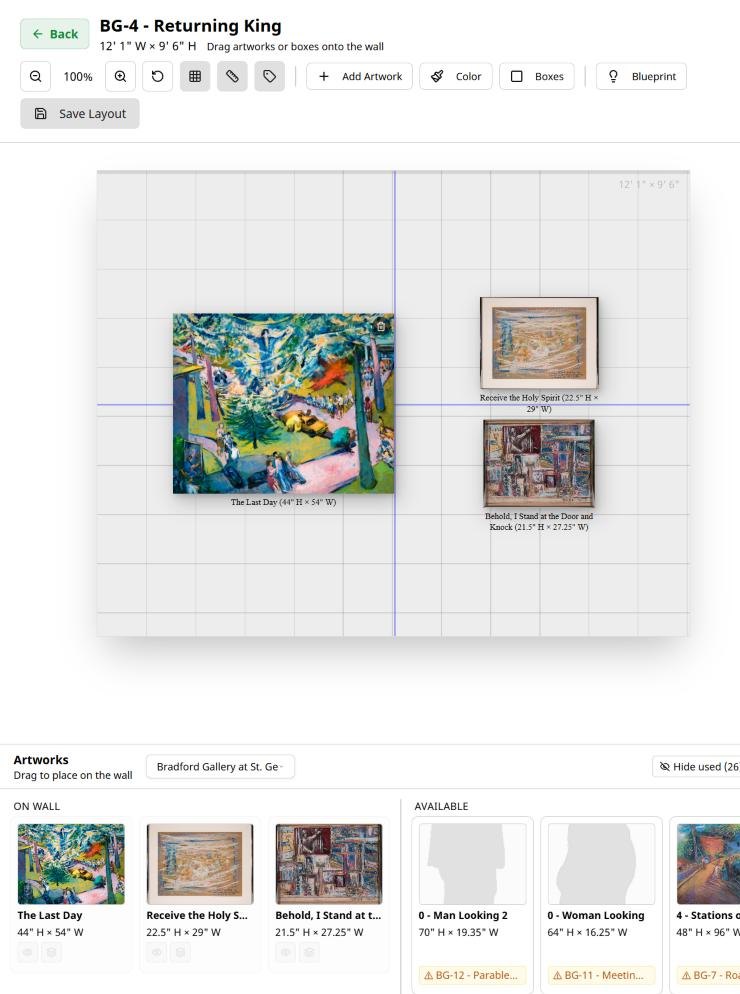
Work out what actually goes where
Move pieces between walls, try the other order, swap one large work for two smaller ones, pull one out and see what the wall does without it. Snap guides keep things aligned. If you want a second opinion on fit, the Placement Advisor checks dimensions plus clearance against the real wall and shows you the arithmetic.
03
Settle it with everyone who has a say
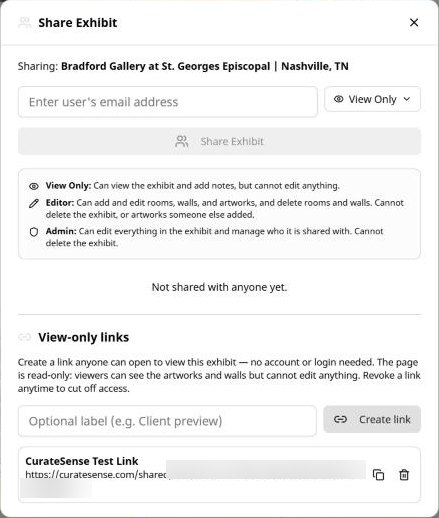
Send a view-only link that opens the plan in a browser — no account, no signup, nothing to install. Label each link and switch it off when that round is over. Or bring people in as collaborators, comment on a specific piece on a specific wall, and resolve a thread when it is settled. The decision ends up in writing, attached to the thing it was about.
04
Know what is ready and where it is
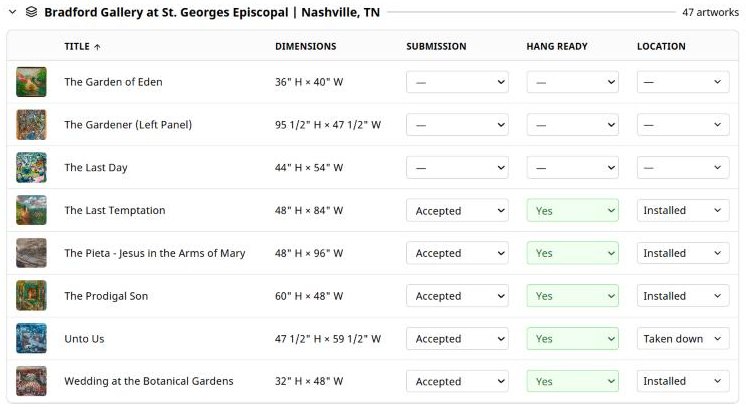
Mark what each piece still needs — framing, wire, plexi, stretching, cleaning, conservation, photography — and set it hang-ready when it is done. Follow each work from packed to shipped to received to installed to taken down. Assign tasks to a person or an exhibit, and send each contact a link showing only what is theirs.
05
Hand off an install that matches the plan
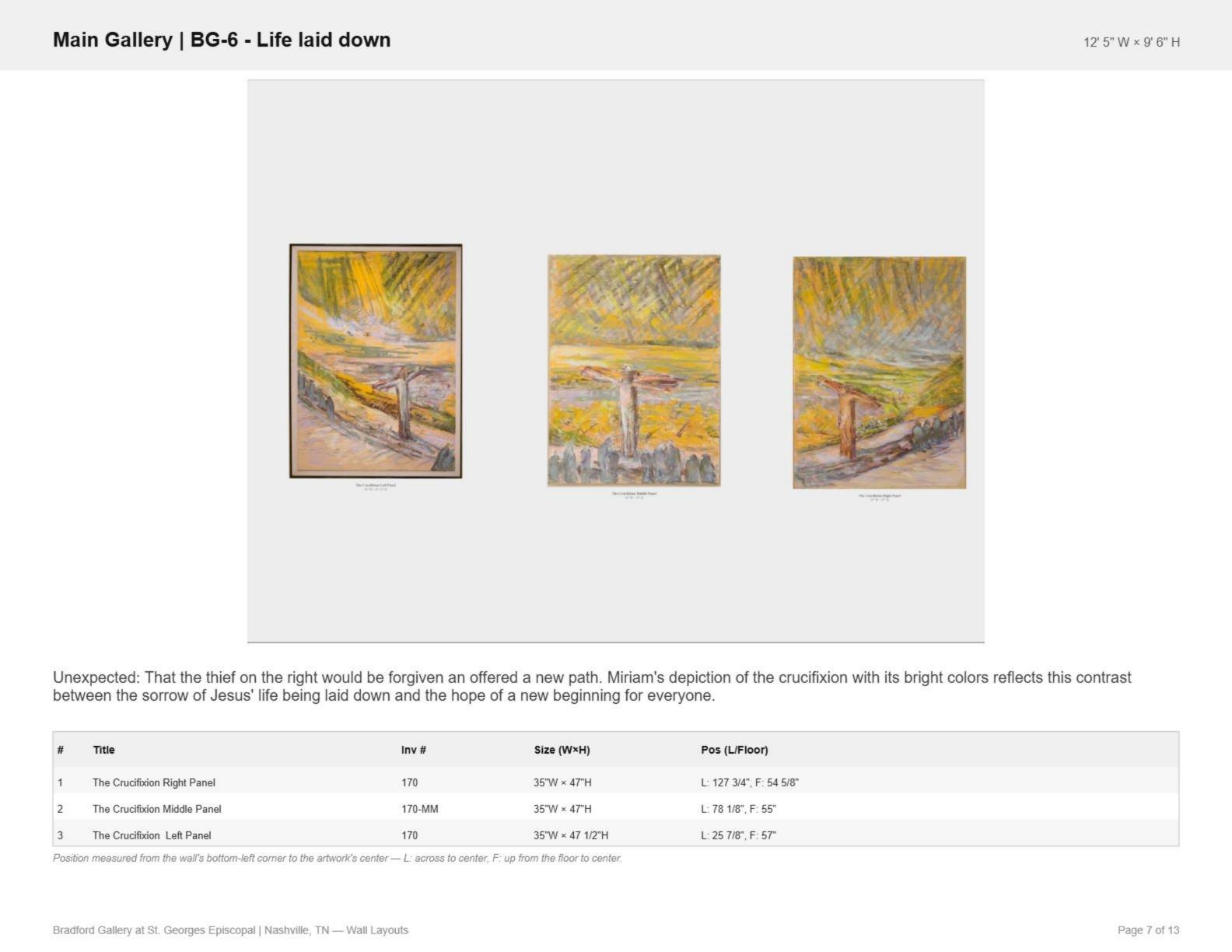
Generate a document with a page per wall, in walking order: the arrangement rendered exactly as you built it, plus every piece measured from the wall's bottom-left corner to its center. Room, order, and height, specified rather than described. Add a works list grouped by wall — as a PDF or a spreadsheet — labels printed in hanging order, and every image in the exhibit with a caption sheet.
Get notified when CurateSense launches.
Sign up to find out when CurateSense is released.
Three assistants with focused jobs
Setup Helper builds the exhibit record with you and can pull a checklist out of a spreadsheet instead of making you retype it.
Placement Advisor checks whether a piece fits a wall and shows the math.
Narrator drafts an introduction or a label in plain language, and will cut something you wrote down to label length. Accept a draft and it becomes that work's label.
All three are bounded. Neither the Advisor nor the Narrator writes to your records on its own — they suggest in a chat window, and a Narrator draft becomes a label only when you accept it. None of them select work, decide sequence, or make a curatorial judgment, and CurateSense works completely without them.
Four kinds of people plan exhibits. The problem looks different from each vantage point.
Artists
You have seen the space once, if you are lucky, and you are planning an entire exhibit from a phone full of photos and a measurement in a notebook. The biggest risk is misjudging scale, and it costs you in framing, freight, and the week before the opening.
Galleries and art centers
You know your rooms by heart. The work is in a studio somewhere and will not arrive until the week before. And this is one of nine exhibits this year, each at a different stage, with no registrar and no preparator.
Art consultants and advisors
The proposal is what you are selling, and the client cannot picture it. Then the art committee, the designer, and the facilities lead all have to agree, which is the part that actually goes wrong.
Museums and institutions
The people who approve the exhibit are the people least able to picture it from a checklist, and the committee meets monthly. The installation has to be specified down to the height, and if there is no registrar, all of it lands on the curator.
How CurateSense works for you
- 1
Create the space
Enter rooms and walls at real dimensions. Once.
- 2
Bring in the work
Import from a spreadsheet, upload images in bulk, or let the Setup Helper pull the works out of a file.
- 3
Place it, then adjust it
Arrange, rearrange, compare. Find the problem now rather than on the floor.
- 4
Settle it
Send the link. Get the layout agreed, in writing, weeks out.
- 5
Install from the document
Wall-by-wall layouts with heights, a works list, labels, and each person's own task list.
Get notified when CurateSense launches.
Sign up to find out when CurateSense is released.
Three things worth saying plainly
It is not an art inventory or collections system.CurateSense is the record of an exhibit, not a catalogue of everything you own. ArtworkArchive, TMS, PastPerfect and the rest stay your system of record. Bring the works in for the exhibit.
It is not a 3D walkthrough.Wall layouts are enforced to scale, and that is where the planning happens. You can upload a floor plan and place work on it for orientation and flow, but that view is a reference image, not a scaled or virtual model of the room.
It is not a design suite.No CAD, no layers, no learning curve. It does one job: planning a physical exhibit in a real space, to scale, before anything moves, ships, or hangs.
Plans for every stage of your practice
From your first solo exhibit to a full institutional program.
Artists
For artists only. Our foundational features to successfully plan your next exhibit.
$9/mo
billed annually — $108/year upfront
- 3 total exhibits: 2 active, 1 archived
- 6 rooms
- 24 walls
- 250 artworks
- Setup Assistant: skip the data entry
- Printable labels
Galleries
Make planning your next gallery show seamless and simple.
$19/mo
billed annually — $228/year upfront
- 15 total exhibits: 10 active, 5 archived
- 120 walls
- 30 rooms
- Up to 750 artworks
- Planning Assistants: Setup Helper, Placement Advisor and Narrator
- Printable labels
Single Exhibit
One-time $89 payment — 3 months of access, no subscription.
$89
one-time payment · no subscription · non-refundable
3 months of access · one 3-month extension available at the same price
- 1 total exhibit: 1 active, no archived
- 8 total rooms
- 32 total walls
- Up to 250 artworks
- One-time payment · no subscription
- Planning Assistants: Setup Helper, Placement Advisor and Narrator
- 3 months of access from purchase: non-refundable
- Printable labels
Non-refundable once bought. The free 7-day trial is the way to try CurateSense first.
Common questions
Who is CurateSense for?
Can I plan an exhibit for a space I have not visited?
Can someone see my plan without creating an account?
Can I send the layout to whoever is hanging the work?
Do I need design or CAD experience?
Can I bring in work I already have in a spreadsheet?
Can I use it for spaces that are not galleries?
What can I take out of the app?
What does the free trial include?
How much does it cost?
Resolve potential issues before they become expense problems
Create the walls. Place the work. Send the link. Walk into install day knowing exactly what happens.